



Employees wait on access fixes, managers stall when approval tools misbehave, finance teams lose time when printers or invoice systems fail, and customers feel the delay when small IT issues sit too long. Benefits of remote IT support are practical: faster help for common problems, fewer work stoppages, and better continuity when support fits how your team works.
Paul Gaponov, Founder and President at GitsTel, notes: “Remote support improves response time by getting live help to the user’s screen quickly, which keeps routine issues from turning into lost work time.”
Benefits Of Remote IT Support For Everyday Work Interruptions
Small IT issues become workflow problems when users wait too long for help. A locked account can delay payroll review, a software error can block a customer update, and a device setup problem can leave a new hire idle.
Look at remote support through employee productivity, not just ticket volume. The practical question is simple: how quickly can people get back to work?
-
Faster common fixes: Password resets and software errors, device setup, and connectivity issues can often be handled while the user stays at their desk.
-
Live user guidance: During business hours, we walk users through the issue instead of leaving them to guess through settings.
-
Fewer onsite dispatches: When a problem can be resolved remotely, you avoid waiting for a technician visit the issue never required.
-
Support across locations: Distributed teams get consistent help using cloud productivity collaboration tools even when there’s no IT person in the building.
Those day-to-day fixes lead into broader support capabilities. Troubleshooting, system maintenance, user guidance, and urgent after-hours response work better when support follows the way work actually moves.
Remote IT Support Benefits That Improve Response Times
A customer-facing team loses access to a key application while a manager waits to approve an order change. That’s where remote it support benefits show up in the workflow, not just in the ticket queue.
-
Quicker first contact Users get help without waiting for travel time or an on-site opening.
-
Less ticket back-and-forth Live troubleshooting lets us see the error, ask better questions, and guide the user through the fix when possible.
-
Shorter user downtime If an employee can’t open a shared file or connect to a work application, remote support helps narrow the cause while details are fresh.
-
Coverage across work schedules Remote support fits teams working from different locations, late shifts, or early deadlines.
-
Cleaner on-site escalation When hands-on repair is needed, remote triage identifies the device, symptoms, and business impact before a technician arrives.
That cleaner handoff keeps the next step tied to the affected workflow. In our remote support work, GitsTel resolves 80% of IT issues on the first call, with an average issue resolution time of 26.8 minutes; for users, that means fewer repeat calls and a clearer path back to work.
Benefits Of Getting Remote IT Support Before Issues Spread
Small IT problems spread when maintenance, updates, and troubleshooting are delayed. One slow WiFi complaint becomes a conference room issue, then a meeting problem, then a customer call that starts late.
Real-world snapshot: We’ve seen support needs tied to WiFi speed improvements, Ethernet port additions, telephone services, printer and scanner workflows, and live streaming support. These everyday systems affect meetings, invoices, front-desk communication, and public events.
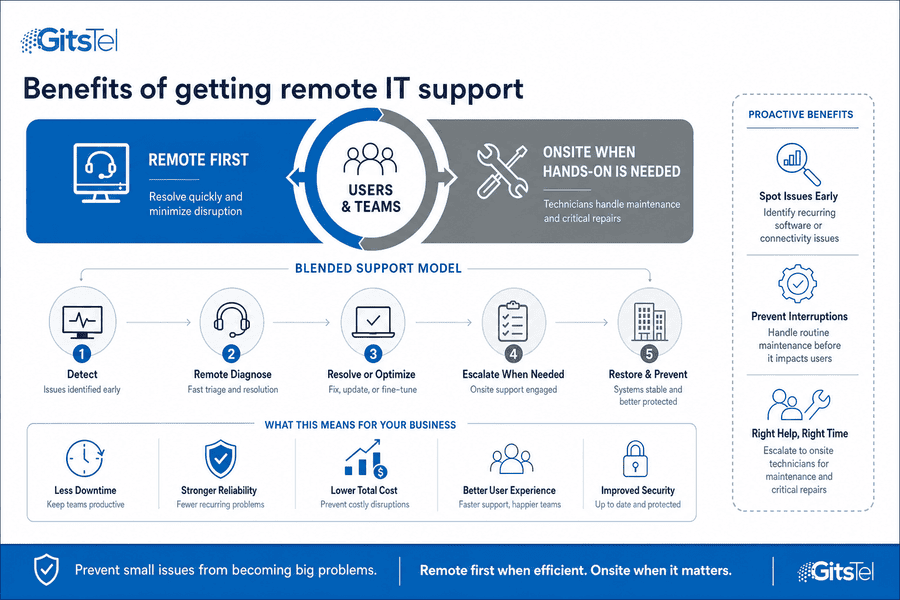
The benefits of getting remote it support are strongest when support is part of preventive operations, not only emergency response. We use remote help to spot patterns early, then bring in onsite technicians when hands-on maintenance or critical repair is required.
-
Recurring issue checks: Repeated software errors or dropped connections point to a larger fix than a single-user workaround.
-
Routine maintenance timing: Updates and health checks can be handled before they interrupt approvals, calls, or invoice processing.
-
Onsite escalation path: When cabling, hardware, or physical repair is involved, onsite support completes the work remote access cannot.
Keep Helpdesk Work Moving
Get Faster Remote IT Support
Keep everyday IT issues from slowing your team down. Talk with GitsTel about remote support that fits your response needs.
Benefits From Remote IT Support For After-Hours Coverage
Problems don’t always wait for business hours: a locked account before a morning deadline, a connectivity issue during evening work, or a customer-facing system problem after the office closes.
After-hours coverage works best when expectations are clear. We tailor urgent after-hours support around priority needs, so the response path is useful without turning every low-priority request into an overnight interruption.
-
Define urgent issues: Separate true work stoppages from requests that can wait.
-
Name escalation approvers: Decide who can approve after-hours action when a ticket affects payroll, sales, service delivery, or a customer deadline.
-
List priority systems: Document the applications, devices, and shared services that need faster support outside normal hours.
-
Review repeat tickets: Look for recurring after-hours problems so maintenance or user guidance can reduce repeat disruptions.
With the right rules, after-hours remote support gives users a clearer path when work needs to continue beyond the standard day.
Remote IT Support And Benefits For Scaling Service Needs
More users, devices, applications, and locations create more ways for support requests to slow the day. A new employee needs access, a remote worker can’t reach a shared drive, and a branch location has recurring call quality issues.
Scaling support takes structure. Remote help becomes more valuable when it’s connected to documented workflows, personalized user guidance, on-site escalation, and review of recurring problems. We support over 1,378 end-users and more than 221 companies across North America, so our approach is built around repeatable workflows rather than one-off fixes.
-
Standard onboarding support: Access setup, device checks, and application sign-ins follow a clear process.
-
Guidance for repeat questions: Repeated software or printer questions become clear guidance instead of isolated tickets.
-
Proactive maintenance habits: Remote troubleshooting and maintenance help catch system issues before they interrupt deadlines.
-
Pattern reporting: Ticket trends reveal repeat IT issues, which helps prioritize training, configuration changes, or on-site repair.
|
Scaling Trigger |
Operational Signal to Track |
Recommended Support Workflow |
Owner or Handoff |
|---|---|---|---|
|
New office opens in another region |
VPN login failures, printer mapping tickets, Microsoft 365 access delays |
Create a location-specific setup checklist covering network access, shared drives, endpoint policies, and local equipment inventory |
Service desk lead coordinates with onsite contact and network administrator |
|
Monthly hiring increases across departments |
Aging onboarding tickets, missing MFA enrollment, delayed group permissions |
Use role-based access templates for Sales, Finance, Operations, and Executive users before the employee start date |
HR submits approved request; IT support provisions accounts; manager validates access |
|
Repeat questions rise after application changes |
Multiple tickets referencing the same CRM field, Teams setting, or password reset step |
Publish short user guides with screenshots and link them in ticket replies for recurring requests |
Remote technician documents fix; knowledge base owner reviews and updates article |
|
Device count expands beyond manual tracking |
Unpatched laptops, expired warranties, antivirus alerts, disk space warnings |
Schedule automated endpoint checks, patch deployment windows, and exception reports for devices that miss updates |
Endpoint administrator reviews alerts; service desk contacts affected users |
|
Ticket volume increases without clear root causes |
High reopen rate, duplicate categories, recurring outages tied to one application or site |
Review monthly ticket trends and escalate patterns into problem management tasks with assigned remediation dates |
IT manager reviews reporting with account contact and assigns infrastructure or application follow-up |
Talk With GitsTel About The Right Support Fit
Faster response times, fewer work interruptions, and better continuity start with support that matches how your team works. We can review current support gaps, after-hours needs, and recurring ticket patterns, then tailor remote support that works alongside on-site help when hands-on service is needed.
Contact GitsTel when you’re ready to compare practical support options and keep access, approval, printer, or invoice system issues from slowing the day.