



Table of Contents
-
How To Handle Support Tickets Without Slowing Down The Workday
-
How To Answer Support Tickets With The Right First Questions
-
What Are Some Of The Most Common Trouble Tickets IT Support Teams Handle
-
How To Track Support Tickets When Support Starts With A Call
-
How To Reduce Invalid Technical Support Tickets With Better Intake
When a user is locked out of an app, work stops at the desk, not in an abstract queue. Phones go down during client calls. A scanner stalls before a deadline. Slow WiFi turns a simple upload into a staff interruption.
That is why intake, routing, and follow-up matter. Ticket volume is not easing, with 75% of customer service reps saying they saw the highest ever volume in customer service tickets in 2024. If you want to know how to handle support tickets well, start with the workflow the issue is blocking.
Will Wark, CFO at GitsTel, notes: “The first support conversation should identify the user, device, business impact, and deadline before troubleshooting starts, because missing context turns simple fixes into repeat interruptions.”
How To Handle Support Tickets Without Slowing Down The Workday
A clear intake and routing process keeps one printer problem from becoming three repeat calls, a missed approval, and a stalled user. With our call-first support model, customers call the support phone number rather than submit through an online portal, so a technician can clarify details live and route the issue correctly.
-
Name the reporter: Confirm who is affected, who approved access, and which user is available for testing.
-
Capture key details: Record the device name, app, location, network, error message, and deadline.
-
Start remote, escalate on-site: Resolve login, software, VoIP, and settings issues remotely; send on-site help for hardware, cabling, access, or network problems that require hands-on work.
-
Confirm work is restored: Have the user print, call, scan, connect, or reopen the file before closing the request.
How To Answer Support Tickets With The Right First Questions
A receptionist cannot make VoIP calls, and callbacks are waiting. A billing user cannot print invoices before approvals are due. Learning how to answer support tickets starts with collecting enough detail to prevent back-and-forth, so the user gets routed to the right help without staying stuck.
-
User and task: Identify who is blocked and what they were trying to complete.
-
Device and location: Capture workstation, phone, printer, access door, or WiFi area.
-
Error and impact: Ask for the exact message and whether calls, filings, appointments, or invoices are delayed.
-
Deadline or urgency: Note court filings, payroll cutoff, appointment schedules, or client handoffs.
How To Categorize Support Tickets For Cleaner Routing
Strong categorization helps support teams move faster, especially when one issue crosses IT, VoIP, access control, security cameras, and the network. Knowing how to categorize support tickets helps us route each call to the right technician, confirm approvals sooner, and reduce handoffs.
-
User access and passwords Route lockouts, permissions, and MFA issues to the team that can verify approvals.
-
Network and connectivity issues Send slow WiFi, Ethernet drops, and switch failures to network support.
-
VoIP and call flow Prioritize missed calls, poor audio, and desk phone provisioning.
-
Devices and office workflows Handle printers, scanners, laptops, and shared file access together.
-
Security systems and footage Coordinate camera, access control, and retention requests without vendor handoff delays.
Keep Support Tickets Moving
What Are Some Of The Most Common Trouble Tickets IT Support Teams Handle
Recurring requests show where workflows, devices, or infrastructure need attention. If you ask what are some of the most common trouble tickets it support, the answer usually starts with access, connectivity, and everyday office systems that interrupt calls, records, invoices, and deadlines.
-
Password and login issues: Gartner ties 40% of help desk calls to password expirations, changes, and resets, while Forrester estimates password resets account for up to 30% of all helpdesk tickets.
-
WiFi or Ethernet problems: Slow uploads, dropped conference calls, and added Ethernet ports affect staff handoffs and customer-facing work.
-
VoIP call quality: Choppy audio, failed routing, or desk phone provisioning errors lead to missed calls.
-
Printer, scanner, and software access: Filing packets, invoices, approvals, and scanned records stall when these workflows fail.
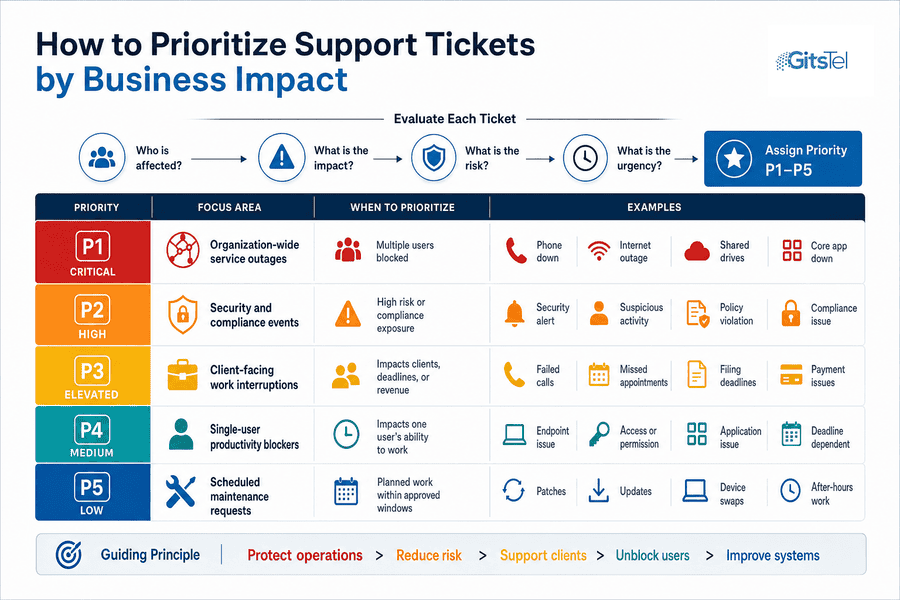
How To Prioritize Support Tickets By Business Impact
Priority should reflect workflow disruption, risk, the number of users affected, and compliance sensitivity. That is how to prioritize support tickets when the queue includes a network outage, a suspicious login alert, and one user who needs software access before an invoice run.
-
Organization-wide service outages Treat phones, internet, shared drives, and core apps as high priority when multiple users are blocked.
-
Security and compliance events Ignored or untriaged alerts were tied to 13% of social engineering incidents, so security alerts need fast review before account access, email rules, or sensitive files are put at greater risk.
-
Client-facing work interruptions Escalate failed calls, missed appointments, filing deadlines, and payment issues because they affect service, revenue, and trust.
-
Single-user productivity blockers Fix endpoint, permission, or app issues based on deadline, not just queue order.
-
Scheduled maintenance requests Plan patches, updates, and device swaps around approvals and office hours so maintenance prevents disruption instead of creating it.
How To Track Support Tickets When Support Starts With A Call
A call-based process still needs disciplined internal tracking. GitsTel customers call for support rather than using an online ticketing portal, so our 100% US-based team documents who called, what was affected, what was tried, who owns the next step, and how resolution was confirmed. That is how to track support tickets while keeping live triage, remote support, on-site escalation, and user confirmation connected.
A front desk VoIP issue needs the extension, call path, and affected phone. A scanner failure before a filing deadline needs the device name and destination folder. A switch issue affecting multiple offices needs ports, users, and recent changes.
Good tracking turns the call into a clear work record the next technician can continue without restarting the conversation.
Streamline Your Support Tickets
GitsTel helps MSP teams improve intake, routing, and follow-up so support issues move faster without disrupting the workday.
How To Reduce Invalid Technical Support Tickets With Better Intake
Invalid tickets often come from unclear ownership, missing device details, duplicate calls, vendor confusion, or training questions that look like system failures. The practical goal of learning how to reduce invalid technical support tickets is to protect fast help without making users feel blamed.
-
Use standard call prompts: Ask for the user, device, location, error, business impact, and deadline.
-
Confirm approved requesters: Define who can request new users, access changes, phone moves, and camera footage.
-
Name every device clearly: Label laptops, printers, switches, access doors, and phones by office location.
-
Set escalation rules: Separate IT, VoIP, access control, camera, vendor, and training requests before routing.
How To Reduce Support Tickets Through Prevention
Survey respondents reported a 24% reduction in help desk tickets and cited reduced troubleshooting and maintenance effort as key drivers of IT efficiency.
Prevention is how to reduce support tickets before users lose time to repeat issues. In our managed support work, preventative maintenance reduces IT issues by 40 to 60%, and that discipline matters across workstations, networks, VoIP devices, access control, security cameras, and cybersecurity controls.
-
Patch and update systems: Keep workstations, servers, apps, and VoIP devices current so known issues do not keep returning.
-
Monitor network health: Review switches, WiFi coverage, firewall alerts, and bandwidth before slowdowns spread.
-
Maintain office devices: Check printers, scanners, cameras, access readers, and endpoints during scheduled service windows.
-
Guide everyday users: Give simple instructions for passwords, file locations, secure approvals, and reporting suspicious messages.
When prevention, response, and on-site support work together, choosing the right support partner becomes an operational decision, not just a technical one.
Keep Support Organized And Your Team Moving
Better intake, categorization, prioritization, tracking, and prevention help users get back to work faster while reducing repeat calls about the same app, phone, printer, network, or access issue. If you want a consultative, 100% US-based team to help with IT support, cybersecurity, VoIP, access control, security cameras, or network support, contact GitsTel and ask about a free IT infrastructure assessment. With 24/7/365 US-based helpdesk support and a 98.2% customer satisfaction rating, we will help you see where support requests are coming from and what needs attention first.